
In today's digital era, providing excellent customer service is a key factor in ensuring the success of your online business. A highly effective method that's gaining widespread recognition involves incorporating an AI-powered chatbot directly into your website. These intelligent chatbots have the capacity to address customer queries, provide instant support, and tailor the interaction to each individual user, all while reducing the workload on your support team.
An invaluable tool that can assist you in creating your very own personalized AI chatbot is ChatwithMyWebsite. In this article, we will guide you through the step-by-step process of constructing an AI chatbot tailored for your website using the capabilities of ChatwithMyWebsite.
However, before we dive into it, let's discuss a bit about ChatwithMyWebsite.
What is ChatwithMyWebsite?
ChatwithMyWebsite is an amazing platform that empowers you to effortlessly create AI chatbots powered by ChatGPT using your data. With this user-friendly AI chatbot builder, you can quickly build, train, and integrate intelligent chatbots. The convenience is unmatched as you can embed the chatbot onto your website with a simple copy-paste of the embed code. By delivering tailored AI solutions, ChatwithMyWebsite strives to enhance information management, boost productivity, and simplify everyday life. You can create a knowledge base in just seconds to a few minutes, depending on the size of the data you upload. Once the AI model is trained, you can easily generate a customized chatbot for your website.
What sets ChatwithMyWebsite apart is its impressive support for over 200 languages and its utilization of multiple Large Language Models (LLMs), including the renowned GPT model developed by OpenAI. With ChatwithMyWebsite, you can harness the immense potential of AI chatbots, simplifying complex tasks and streamlining user experiences to an extraordinary extent. ChatwithMyWebsite empowers you to build NLP-powered chatbots that thoroughly comprehend and respond to customer inquiries with a human-like interaction. This advanced technology guarantees accuracy and precision in responses, enhancing the overall customer experience through seamless and satisfying interactions.
Moreover, when it comes to the security of your data, ChatwithMyWebsite makes no compromises. Your uploaded information remains safeguarded on servers hosted by AWS (Amazon Web Services) in the US East region. This not only guarantees the protection of your data but also ensures its accessibility with low latency.
Here are a few features of ChatwithMyWebsite:
1- Chatbot Powered by ChatGPT:
Leveraging the advanced capabilities of ChatGPT, ChatwithMyWebsite ensures that your chatbot can engage in natural and dynamic conversations with users, providing accurate and contextually relevant responses.
2- Multiple Language Support:
It offers comprehensive support for multiple languages, enabling you to create chatbots that can effectively communicate with users from various linguistic backgrounds. This feature enhances your chatbot's reach and makes it accessible to a broader audience.
3- Easy Integration:
It offers effortless integration, allowing you to seamlessly incorporate the chatbot into your website by copying and pasting the provided embed code.
4- Customizable Look and Feel:
It provides you with the flexibility to customize the appearance and design of your chatbot's interface. You can match the chatbot's appearance with your brand's visual identity, ensuring a consistent user experience across your digital platforms.
5- Shareable AI Chatbot:
Once you've created and fine-tuned your AI chatbot using ChatwithMyWebsite, you can easily share it with others.
6- Customizable Chatbot Prompt:
ChatwithMyWebsite understands that each business or use case has its unique requirements. With the customizable chatbot prompt feature, you can tailor the initial message that the chatbot sends to users. This allows you to fine-tune the chatbot's behavior, tone, and responses to align with your specific objectives.
Does ChatwithMyWebsite offer a free plan?
Yes, ChatwithMyWebsite does offer a free plan that allows you to develop two chatbots and train them using your preferred data. However, this no-cost plan does come with certain restrictions, including a maximum limit of 50 messages per month, usage limited to two knowledge bases, and access to the GPT-3.5 Turbo language model.
Here are the steps for creating the AI chatbot with
ChatwithMyWebsite:
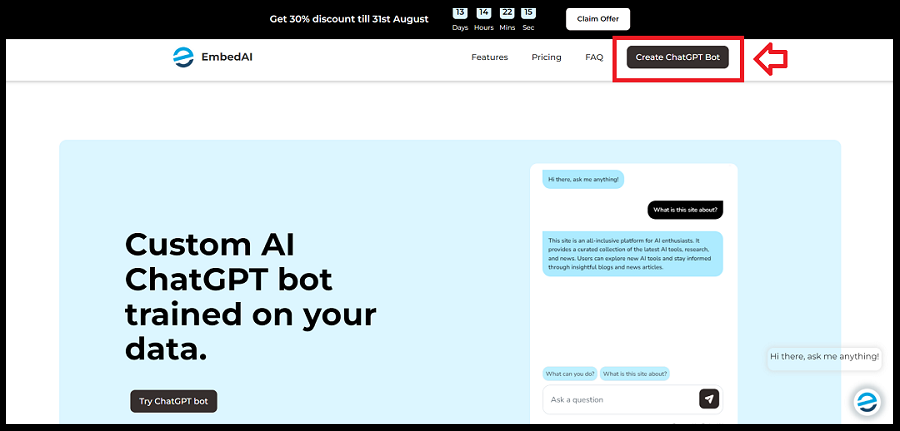
1- Login to ChatwithMyWebsite:
To begin creating your AI bot, you first need to log in to
ChatwithMyWebsite. To do this, navigate to the ChatwithMyWebsite
website and click on the "Create ChatGPT Bot" option.
Then, log in using your Gmail or GitHub account.
Why this page is commercially useful
These notes frame the article as a decision page, not just a background explainer.
Why this guide matters
In today's digital era, providing excellent customer service is a key factor in ensuring the success of your online business. A highly effective method that's gaining widespread…
Best for
Start here if you are trying to understand chatbots before choosing specific tools or vendors.
Next action
Use the related app links below to turn the guide into an actual tool comparison instead of stopping at theory.
Relevant AI apps to evaluate next
These app pages give readers a practical follow-on step after the guide: compare the tools that fit the workflow described above.
.png&w=3840&q=75)