The surge in online searches for information related to WhatsApp
chatbots is indicative of their growing importance in the realm of
customer engagement marketing. Businesses are increasingly
incorporating these chatbots into their strategies, recognizing
their role in enhancing customer interaction, driving growth, and
streamlining queries. This phenomenon is not just a passing trend
but a lasting transformation in the business landscape.
In this article, we delve into the world of WhatsApp
chatbots and offer insights into creating one without needing to
code. Our exploration covers everything about WhatsApp and its
potential to fuel business expansion. If this subject piques your
interest and you're keen to understand the intricacies of
chatbots, we invite you to read through the entire piece for a
comprehensive grasp of leveraging this powerful tool.
So let’s get started…
What is a WhatsApp Bot?
A WhatsApp Bot is an automated program integrated into the WhatsApp messaging service that can autonomously reply to messages. It provides a smart way for businesses to communicate with their customers, responding automatically to inquiries and messages, thereby making customer interactions quicker and more efficient. A WhatsApp bot can engage in various conversations with multiple people simultaneously and operate 24/7. This tool is particularly useful for those seeking to offer fast and effective customer support, leveraging WhatsApp's extensive user network. Simple to use and efficient, WhatsApp Bots are transforming how businesses connect with their clients, delivering instant responses to common queries and enhancing the overall customer experience.
Why use WhatsApp chatbots?
The utility of a WhatsApp chatbot extends beyond mere automation, focusing on elevating customer relationships and, ultimately, improving the customer experience. Here are key reasons to consider the incorporation of WhatsApp chatbots:
Widespread Reach and Engagement:
WhatsApp boasts an impressive user base of 2.7 billion individuals, making it more than just a conventional app—it is a digital phenomenon. By integrating a chatbot, businesses can access a vast and diverse pool of potential customers spanning various age groups.
Preferred Communication Mode:
Research indicates that a significant majority, approximately 61% of consumers, favor messaging as their primary mode of communication. Furthermore, the favorable reception of business communication on WhatsApp is evident, with almost half of its users expressing a preference for this platform. Meeting customers on their preferred communication platform is a strategic approach.
Economical and Efficient:
The era of requiring extensive call centers or hefty Customer Relationship Management (CRM) tools is fading. WhatsApp chatbots not only enable businesses to reduce operational costs but also ensure consistent and round-the-clock customer service. This shift toward efficiency is a testament to the practicality of adopting WhatsApp chatbots in modern business operations.
How do WhatsApp bots work?
WhatsApp chatbots revolutionize conversation automation by harnessing the power of Artificial Intelligence (AI) and Natural Language Processing (NLP). These innovative bots mimic human-like interactions, ensuring quick and efficient responses to user queries. The mechanics of a WhatsApp chatbot are rooted in three fundamental concepts: Trigger, Condition, and Action.
Trigger: This is the starting point, usually a keyword or phrase, that activates the chatbot's responsive functionality.
Action: Following the trigger, the chatbot performs a predefined action, such as sending a relevant message or offering help, depending on the scenario.
Condition: This is the chatbot’s decision-making core. Depending on user input or other variables, the bot follows an “if this, then that” logic to ensure the response is relevant.
For example, when a user sends the message "Track order," the bot initially verifies the order status. If the order has been shipped, it proceeds to share the tracking details as a response. In cases where the order has not been shipped, the bot may offer an estimated shipping date.
The chatbots' use of NLP allows them to adeptly interpret messages, ensuring they grasp and respond to user inquiries effectively. Additionally, AI's role is pivotal as it enables the chatbots to learn from previous interactions, thereby refining and enhancing their responses over time.
Why Do Enterprises Use WhatsApp Chatbot For Business?
Enterprises are increasingly turning to WhatsApp chatbots to elevate their customer communication and engagement strategies, drawn by the numerous advantages this technology offers.
1. Accessibility
WhatsApp stands out as one of the most widely used messaging platforms globally. This ubiquity makes it incredibly convenient for businesses to connect with customers on a platform already ingrained in their daily routines. Leveraging WhatsApp AI chatbots allows businesses to streamline communication, offering customers personalized experiences within the familiar confines of the platform.
2. Instant Communication
The use of chatbots on WhatsApp ensures swift responses to customer queries, contributing to an enhanced overall customer experience by minimizing wait times.
3. Cost-Efficiency
By automating responses through chatbots, businesses can significantly cut costs by reducing the need for human agents to handle routine queries. This automation translates to resource savings and operational efficiency.
4. 24/7 Availability
WhatsApp AI chatbots operate seamlessly around the clock, providing customer assistance at any time, irrespective of regular business hours.
5. Scalability
As the volume of customer queries surges, chatbots can efficiently handle multiple conversations simultaneously, ensuring effective communication even during peak periods.
6. Personalization
Advanced chatbots can be programmed to analyze data, tailoring responses to customers by offering personalized recommendations or solutions based on their preferences and past interactions.
7. Transaction and Order Processing
WhatsApp chatbots facilitate transactions, bookings, or order placements directly within the chat interface, simplifying the customer journey and boosting convenience.
8. Engagement and Marketing
Businesses integrate chatbots into their WhatsApp marketing strategies, leveraging them to send promotional messages, updates, and engaging content to subscribers. This fosters brand loyalty and strengthens customer engagement.
9. Feedback and Surveys
Chatbots play a pivotal role in conducting surveys and collecting feedback from customers, providing valuable insights that businesses can use to enhance their products or services.
10. Integration
These chatbots seamlessly integrate with other business tools and systems, fostering a smooth workflow and enabling efficient data sharing.
In summary, the adoption of WhatsApp chatbots by businesses streamlines customer interactions, improves operational efficiency, and provides a convenient avenue for engaging with the audience. Ultimately, this enhances customer satisfaction and propels business growth.
How to Create a WhatsApp Bot For Free
Creating a WhatsApp Business Chatbot is a breeze, and you can
achieve it effortlessly in three simple steps:
Step 1: Buy a Phone Number
Begin by purchasing a phone number dedicated to your WhatsApp Bot. I recommend opting for a prepaid number from a local telecom provider. Even if you've previously utilized the WhatsApp Business App on your iPhone or Android, it's advisable to employ a new phone number, as suggested by WhatsApp. Ensure that the selected phone number is capable of receiving text messages, as this will be crucial for verification later on.
Step 2: Set Up a Free Manychat Account
Proceed to create a free Manychat account, a top-notch platform for
developing WhatsApp chatbots. This exceptional platform stands out
for several compelling reasons.
- It's user-friendly, allowing you to dive in without any prior chatbot experience.
- It's a no-code platform, enabling you to construct bots without writing a single line of code.
- It's cost-effective, offering a free plan and a paid plan starting at just $15 per month.
To set up your Manychat account, just follow these straightforward
steps outlined below:
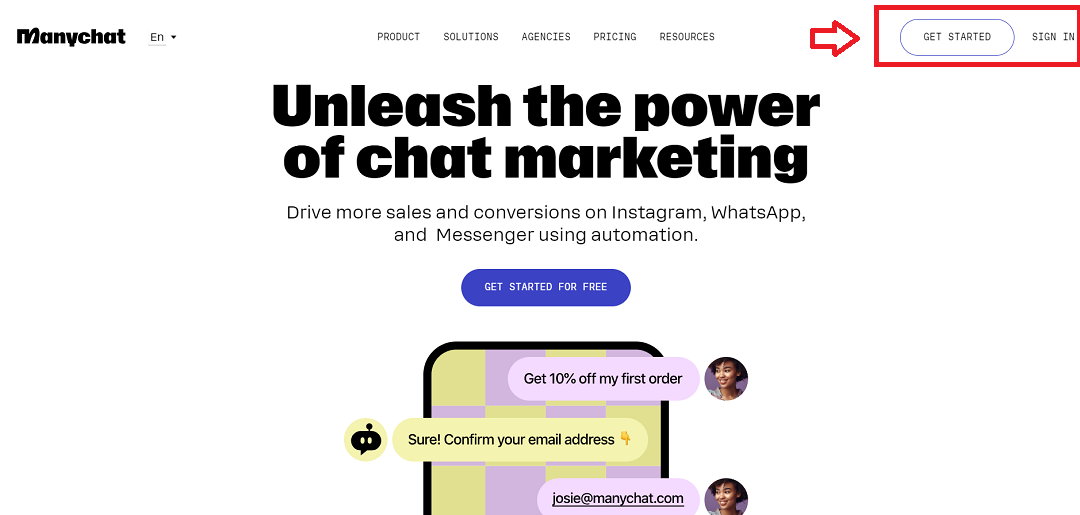
Navigate to the Manychat
website and click on the "Get Started Free" button in the
upper right corner of your screen.
Why this page is commercially useful
These notes frame the article as a decision page, not just a background explainer.
Why this guide matters
The surge in online searches for information related to WhatsApp chatbots is indicative of their growing importance in the realm of customer engagement marketing. Businesses are…
Best for
Start here if you are trying to understand chatbots before choosing specific tools or vendors.
Next action
Use the related app links below to turn the guide into an actual tool comparison instead of stopping at theory.
Relevant AI apps to evaluate next
These app pages give readers a practical follow-on step after the guide: compare the tools that fit the workflow described above.
.png&w=3840&q=75)